marți, 29 ianuarie 2013

Setari android digi

http://yoncyblog.wordpress.com/category/android-2/

De aici am luat si a mers
Pentru a folosi   cartela de la modemul usb de la RDS direct pe un telefon compatibil 3G UMTS si alte cele e nevoie de catva setari speciale. Si ma  refer in special la telefoanele cu Android. Metoda e testată de mine pe un Galaxy S si probabil  ar trebui sa mearga pe majoritatea telefoanelor cu Android.
Ce trebuie facut e  adăugarea unui APN (punct de acces internet).
Cum se face:
  • Sub Settings mergem la Wireless and network 
  • Acolo alegem penultima optiune Mobile networks
  • A treia optiune e Access Point Names. Aici vom adauga un punct de acces de internet cu ajutorul caruia facem posibila conectarea.

  • Din meniu alegem New Apn . Setările ce vor urma vor fi:
  1.  La Name  - > internet
  2.  La APN – > internet
  3. Proxy, port, username, password, server, MMSC, MMS proxy MMS port vor fi lasate goale.
  4. La MCC  avem -> 226
  5. la MNC ->05
  6. La Authentication Type lăsăm -> None
  7. Iar la APN Type alegem -> internet
Cam ăstea ar fi după salvarea acestui APN si selectarea lui ar trebui sa apară in bara de notificări semnul de conectare 3G.


La mine a mers  dacă  aveți ceva probleme lăsați un comentariu și vedem ce putem rezolva.

joi, 20 septembrie 2012

Removing Articles word from articles in Joomla 2.5

Code:
components\com_content\views\article\view.html.php


Around line 166 is:

Code:
   if ($menu)
      {
         $this->params->def('page_heading', $this->params->get('page_title', $menu->title));
      }
      else
      {
       $this->params->def('page_heading', JText::_('JGLOBAL_ARTICLES'));
      }


just comment line:

Code:
 $this->params->def('page_heading', JText::_('JGLOBAL_ARTICLES'));


And its done :)

luni, 2 iulie 2012

Unwanted Links in templates

Link-uri in template-ul  it_university, in pagina de print preview.

There is a image for reference:
Image
Attachment:
strange.jpg

If anyone can help me to remove that it will be great.
Hello,
It's maybe a ads in your templates?

What do you have to templates?
You're probably using a free template or a free extension with back link. Those links are base64 encoded, that's why you can't find them. Search in your template dir for something like base64_decode("....")
duyet wrote:
You're probably using a free template or a free extension with back link. Those links are base64 encoded, that's why you can't find them. Search in your template dir for something like base64_decode("....")


Thank you verry much. I found that:

<?php
$pml='PGRpdiBpZD0iaXQtc3AiPjxhIGhyZWY9Imh0dHA6Ly93ZWItY3JlYXRvci5vcmcvIiB0YXJnZXQ9Il9ibGFuayIgdGl0bGU9ItGI0LDQsdC70L7QvdGLINGB0LDQudGC0L7QsiI+0YjQsNCx0LvQvtC90Ysg0YHQsNC50YLQvtCyPC9hPjxicj48YSBocmVmPSJodHRwOi8vam9vbWxhLW1hc3Rlci5vcmcvIiB0YXJnZXQ9Il9ibGFuayIgdGl0bGU9Impvb21sYSB0ZW1wbGF0ZXMiPmpvb21sYSB0ZW1wbGF0ZXM8L2E+PC9kaXY+';
echo base64_decode($pml);?>


in: .../template/html/com_content/article/default.php

Thank you verry much again :pop

vineri, 6 aprilie 2012

Adaugare module noi la IT University Template

Poate merge si la altele

n order to add a new module position in your template you have to:
1-Open the index.php file of the Template you wish to edit
Locate the place in the Template where you wish to put the new position.
Insert:
<jdoc:include type="modules" name="newposition" />

2-Open the Template's TemplateDetails.xml file and locate the
<positions></positions> Start and end tags

Then add:
<position>newposition</position>

The logo is added as a module through the module manager. So create a new html module and add only the logo image there. Then position the modoule on the "logo" position.

Acum se va traduce modulul cel nou folosind calea de traducere uzuala - Falang sau Joomfish. Se va edita main page html din template pentru a se scoate codul in plus - in cazul meu logo-ul original

joi, 5 aprilie 2012

Ascundere cuvant Subcategories la listarea acestora

Pentru asta se umbla in css-ul template-ului si se adauga aceste randuri
CSS:
div.cat-children h3 {
display:none;
}


Atentie! Daca este un site multilanguage se vor rescrie css-urile corespunzatoare limbilor!

Vizualizarea modulelor in template-uri in Joomla 2.5

Select Template Manager from the Extensions menu:
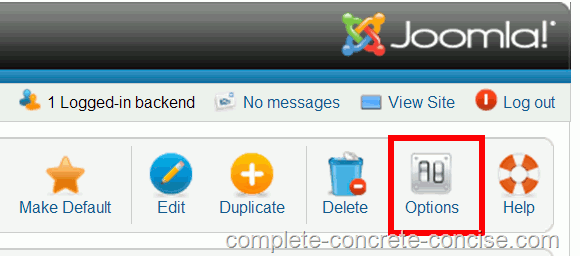
Click on the Options icon:

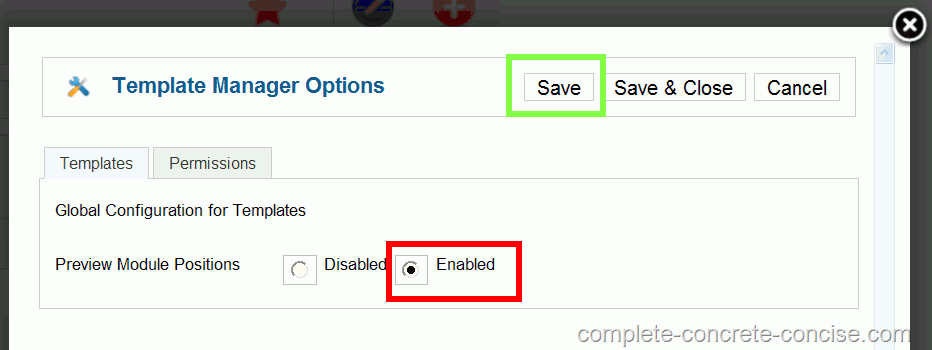
(4) Click on the Enabled button of the Preview Module Positions entry.Then click on Save or Save & Close to save the change.

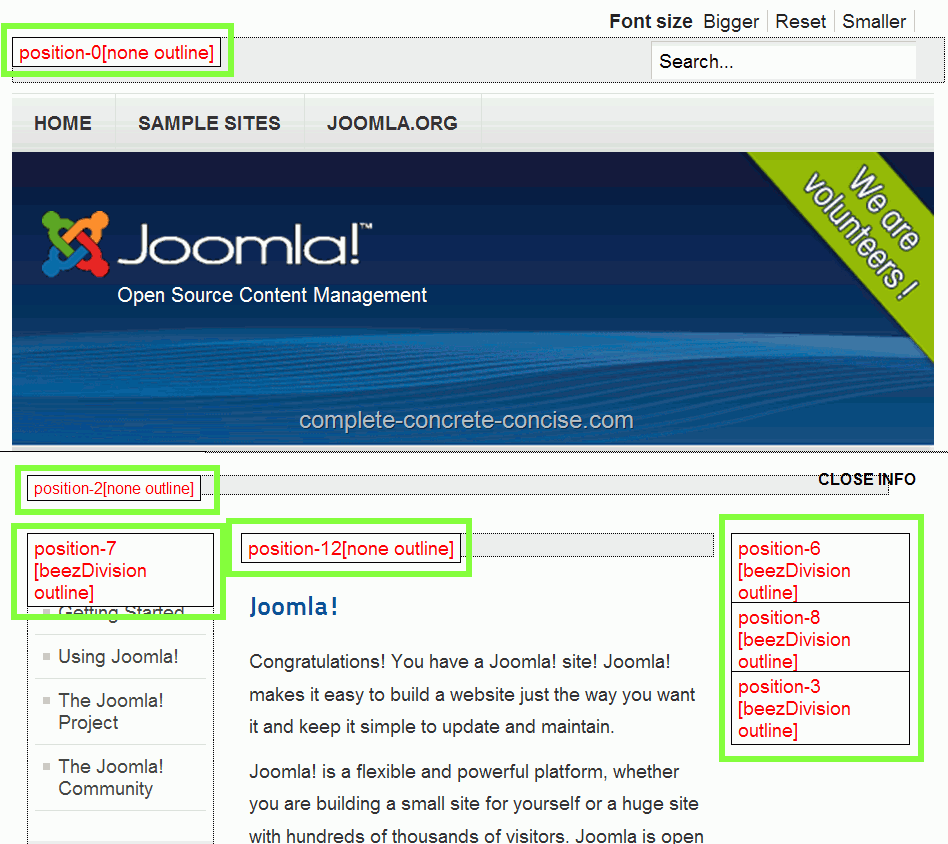
(5) Observe that module positions are now visible on your Joomla! pages when you append ?tp=1 to the end of your URL:

When you are done examining module positions, remember to set Preview Module Positions to Disabled.

miercuri, 4 aprilie 2012

how to remove Joomla FaLang (JoomFish) copyright link

Solution:

Falang version: 1.1.1

File Location: {joomlaroot}/administrator/components/com_falang/classes/FalangManager.class.php

Line #: 464

Replace following line
$cacheBuf2 = 'PGRpdj48YSBocmVmPSJodHRwOi8vd3d3LmZhYm9iYS5jb20iIHN0eWxlPSJmb250LXNpemU6IDhw'.
'eDt2aXNpYmlsaXR5OiB2aXNpYmxlOyBkaXNwbGF5OmlubGluZTsiIHRpdGxlPSJGYWJvYmEgQ3Im'.
'ZWFjdXRlO2F0aW9uIGRlIGNvbXBvc2FudCANCkpvb21sYSI+RmFMYW5nIHRyYWR1Y3Rpb24gc3lz'.
'dGVtIGJ5IEZhYm9iYTwvYT48L2Rpdj4=';

with this
$cacheBuf2 = '';


latst version
In the file "FalangManager.class.php", go to line 468
"$cacheBuf2"
and in line 471, give the property "none" to "display":
Code:
 $cacheBuf2 =
        '<div><a title="Faboba : Cr&eacute;ation de composant'.
        'Joomla" style="font-size: 8px;; visibility: visible;'.
        'display:none;" href="http://www.faboba'.
        '.com" target="_blank">FaLang tra'.
        'nslation syste'.
        'm by Faboba</a></div>';


and the copyright (a little bit too much intrusive) disappears.

Pentru Falang 1.2
The the copyright is located into {root}/plugins/system/falangdriver/falangdriver.php on line 61.
se sterge continutul si gata!.